



Gmail updates 2025: How to adapt your email marketing strategy? The Purchases tab: a new destination for your transactional emails
7 November 2025
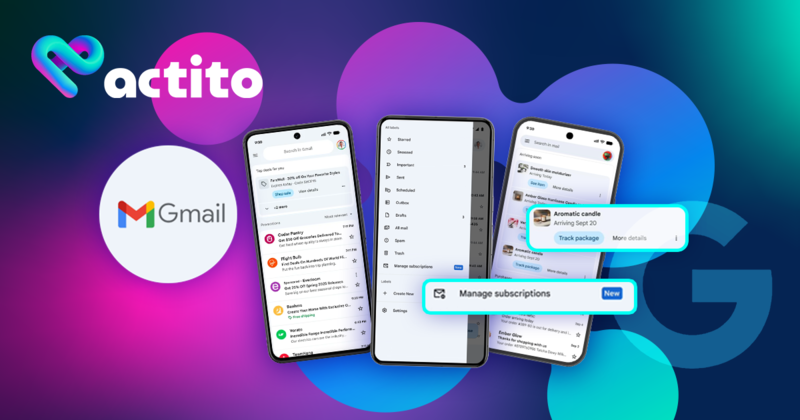
Gmail updates 2025: How to adapt your email marketing strategy?
The email ecosystem is constantly evolving, and Gmail, with its 1.8 billion active users, has just announced significant changes for 2025. These updates are transforming the game for marketers while aiming to improve the user experience.
Since Gmail is the primary inbox in Europe and the United States, it's essential to adapt your strategy to maintain the visibility of your communications. Our team of experts is here to help you adjust your strategy in response to these changes.
1. The subscription management center: transparency for efficiency
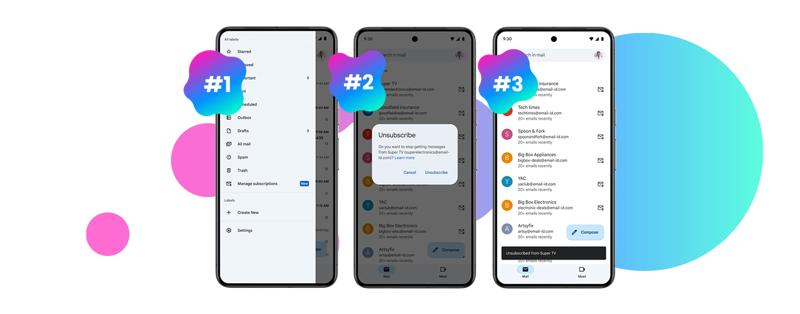
Gmail is gradually rolling out a "Manage subscriptions" dashboard that centralizes all the senders a user is subscribed to. This feature, already available in the United States and currently being deployed in Europe, displays the volume of emails recently received and offers a one-click unsubscribe option.
How does this new feature work?
Gmail automatically groups messages from the same sender. When a user clicks "Unsubscribe," the unsubscribe link is activated for all messages coming from that sending address.
What this means for your strategy:
Focus on quality over quantity: This feature will naturally increase unsubscribe rates for communications deemed irrelevant or too frequent. Each unsubscribe is a valuable signal to refine your strategy.
Segment with precision: Fine-tune your segmentation to adapt your communications to the actual preferences and behaviors of your recipients. For less engaged contacts, prioritize reducing frequency rather than attempting forced reactivation.
Differentiate your thematic communications: If you manage multiple types of newsletters, consider using distinct sending addresses to allow users to selectively unsubscribe, without excessively multiplying sending addresses.
2. The Promotions tab reimagined: relevance as a key visibility factor
Gmail's Promotions tab is introducing a relevance-based sorting mode that complements the traditional chronological display. This new ranking prioritizes emails generating the most engagement (opens, clicks, replies) over simple sending chronology.
Gmail may also highlight "Best deals for you" cards, intensifying the competition for user attention.
Implications for your strategy:
Frequency no longer guarantees visibility: Regularly sending communications is no longer enough to secure a top spot in the Promotions tab. Your messages will be ranked according to their perceived relevance and historical engagement level.
The Promotions tab becomes a performance-based competitive space: Far from being a "penalty zone," this tab becomes an environment where quality and relevance determine visibility.
Leverage behavioral data: Use the wealth of behavioral data to personalize your subject lines, content, and offers according to the preferences demonstrated by your recipients.
Test and optimize continuously: Implement regular testing for different approaches and refine your strategy based on the results obtained, maximizing your visibility in this new environment.
3. The Purchases tab: a new destination for your transactional emails
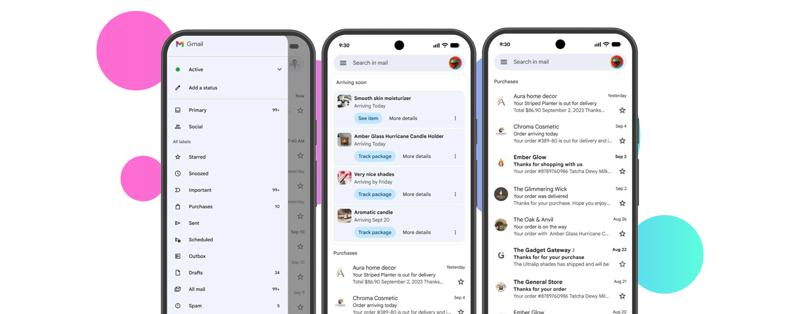
Gmail is introducing a Purchases tab dedicated to transactional emails like order confirmations, shipping notifications, or delivery information. While messages about imminent deliveries (within 24 hours) may still appear in the Primary tab, the majority of transactional communications will now be grouped in this new space.
How to adapt your approach:
Polish your transactional templates: Even in a dedicated tab, these communications remain essential to the customer experience and directly contribute to satisfaction and brand image.
Ensure complete information: Verify that your templates include all relevant data (order number, delivery date, tracking link) and maintain a visual identity consistent with your brand.
Anticipate changes in metrics: Gmail now allows tracking a package directly from the inbox, which may reduce click-through rates without reflecting an actual performance decline.
Clearly distinguish transactional and promotional communications: Use separate senders and subject lines, and avoid including promotions in your order emails to preserve their classification in the appropriate tab.
Rethinking your email strategy in light of these changes
These developments confirm an underlying trend: the perceived value and engagement generated by your communications now determine their visibility, far more than their volume or frequency. To succeed in this new environment, focus on these key aspects:
- Create communications worth opening: Prioritize relevance, clarity, and offers truly tailored to your recipients' needs.
- Respect your contacts' preferences: A transparent unsubscribe process fosters a healthier and more engaged contact base.
- Prioritize engagement over quantity: Particularly in the Promotions tab, performance now determines visibility.
- Invest in your transactional communications: These messages strengthen trust and consistency in your brand.
- Adjust your performance indicators: Variations in open or click-through rates may reflect algorithmic changes rather than content issues.
At Actito, we believe that every journey is unique. These Gmail changes represent an opportunity to create even more personalized and relevant experiences for your customers.
Want to adapt your email strategy to Gmail's new requirements?