



Email deliverability key metrics: how to measure and optimize your sender reputation
22 October 2025
Email deliverability key metrics: how to measure and optimize your sender reputation
Emails are like sending letters. Sometimes they arrive. Sometimes they get lost. In marketing, you want to make sure your emails reach their destination. That's where deliverability comes in.
But how do you know if your emails are getting through? It's simple: you look at the deliverability metrics. These numbers tell you if your emails are being received or not. They help you understand why email providers filter your messages and help you identify what needs fixing.
In this article, we'll look at these important metrics. We'll also explain how to improve your email campaigns. No complicated jargon, promise. Just useful information to help you better communicate with your customers.
What is email deliverability and why is it important?
Email deliverability is simply the ability of your emails to reach the inbox of your recipients. Imagine sending 100 emails. If 80 reach their destination, your deliverability rate is 80%. Not complicated, right?
But why is it so important? Here are three simple reasons:
- Your messages get read: An email in the inbox is more likely to be opened than one lost in spam limbo
- Your money is well spent: Every undelivered email is wasted time and money. Good deliverability means better return on investment
- Your reputation stays intact: Email providers judge your reliability. The more your emails are well received, the more they trust you. It's a virtuous cycle
Deliverability is tied to your sender reputation. It's like your ID in the email world. Good reputation? Your emails get through. Bad one? They end up in the trash.
Main deliverability metrics to monitor
To properly manage your email campaigns, you need to monitor certain key metrics. Here are the most important ones:
Deliverability rate
This is the percentage of emails that actually reach the inbox. A good rate? Aim for at least 98%. Below that, there's work to do.
Open rate
It indicates how many people open your emails. A high open rate suggests your emails are anticipated and appreciated. Note that with Apple's new privacy policies, this number can be skewed.
Click rate
This rate shows reader engagement. How many click on your links? It's a good indicator of interest in your content.
Bounce rate
There are three types of bounces:
- Soft bounce: temporary problem (full inbox, server down)
- Hard bounce: permanent problem (invalid address)
- Spam bounce: refusal of delivery by webmail due to your reputation (blocking)
A high bounce rate hurts your reputation. Keep it under 2%.
Spam complaint rate
This is the percentage of recipients who mark your emails as spam. Even a low rate can seriously affect your reputation. Aim for less than 0.1%.
Unsubscribe rate
It indicates how many people unsubscribe after receiving your email. A high rate signals that your content doesn't meet your audience's expectations.
Dissatisfaction rate
It indicates the percentage of people who want to unsubscribe compared to those who clicked. If the rate is high, it means your sends generate more disengagement than interest.
These metrics are interconnected. A drop in open rate can lead to a drop in click rate, for example. Monitoring them regularly will help you spot problems before they become critical.
Tools to measure email deliverability
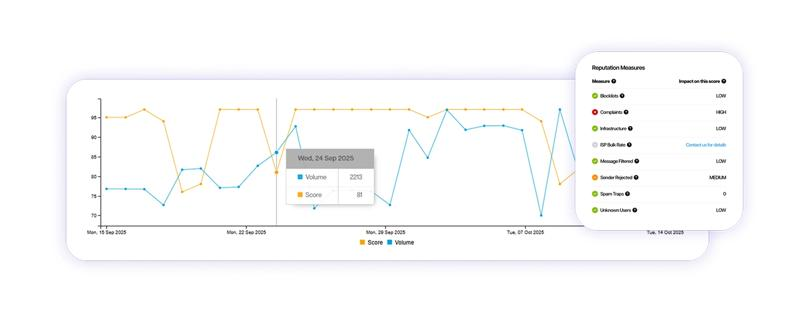
To effectively monitor your deliverability, several tools are at your disposal. Each offers a unique perspective on your email campaigns' health.
Sender Score
Sender Score, developed by Validity, is like a report card for your emails. It rates your sender reputation on a 100-point scale, based on your IP address.
This score takes into account various factors:
- Spam traps in your lists
- Hard bounces (NPAI)
- Received complaints
- Quality of your sending infrastructure
While useful, keep in mind it doesn't cover all email providers, particularly Gmail.
SNDS (Smart Network Data Service)
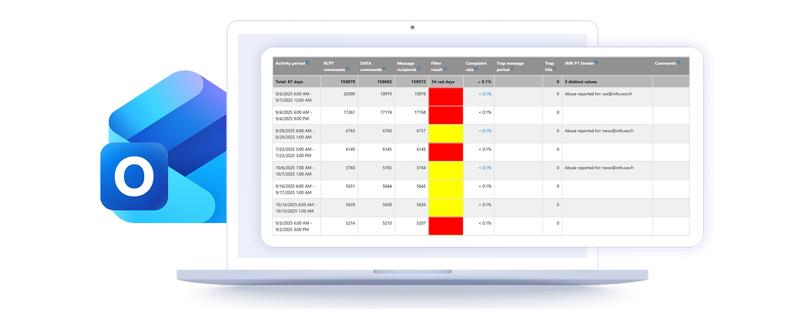
SNDS is Microsoft's historical tool. It gives you insight into your reputation with Microsoft domains like Hotmail or Outlook.
SNDS uses a traffic light system:
- Green: excellent deliverability (>90% inbox placement)
- Red: serious problems (>90% spam)
- Yellow: intermediate zone (10-90% inbox placement)
Note that yellow status can be difficult to interpret as it covers a wide range of performance, and indicators don't always reflect your actual reputation.
Google Postmaster Tools
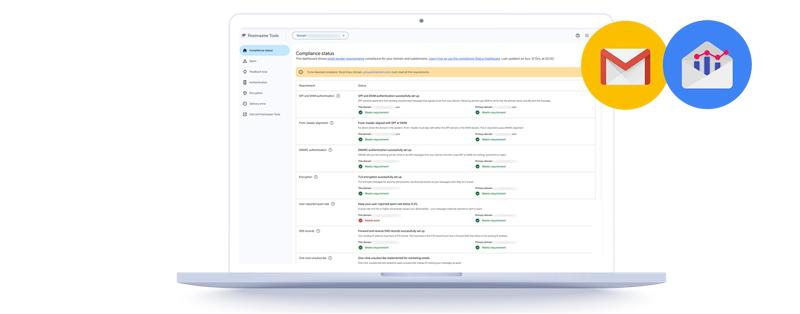
This essential tool is crucial if you send many emails to Gmail addresses. Unlike previous tools, it's based on your sending domain rather than your IP.
It informs you about:
- Your domain reputation
- Your spam rates
- Technical aspects like email encryption
Since 2022, it even includes a "compliance status" indicating if you meet Gmail's requirements.
However, a major change is coming: Google announced the upcoming retirement of version 1 of Postmaster Tools. In version 2, domain and IP reputation graphs won't be maintained.
While this change may seem restrictive, it comes with clearer data on Gmail requirements adoption. This change actually benefits long-term deliverability by encouraging senders to focus on what really matters: content quality and recipient engagement. By removing these metrics, Google pushes marketers to adopt healthier, user-centered practices, which should improve the overall email experience and, consequently, deliverability.
Yahoo Sender Hub
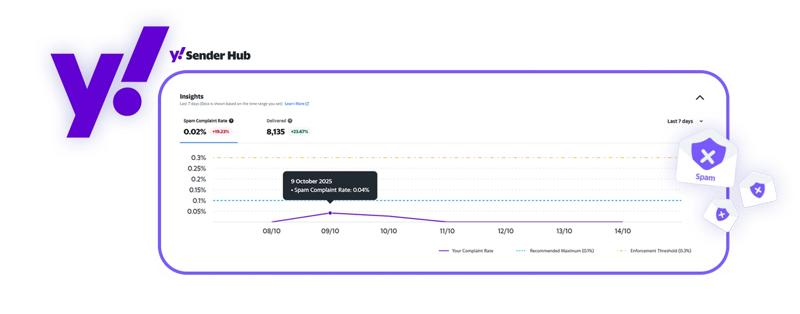
Yahoo Sender Hub is the newcomer to the family. It covers Yahoo and AOL addresses. This tool provides valuable information about:
- Your complaint rates
- Number of effectively delivered emails
- Evolution of these metrics over time
This is particularly useful for understanding your performance with these specific providers.
Using these tools in combination will give you an overall view of your deliverability. But remember: email providers don't reveal all their secrets to protect their users. The key to good deliverability remains following email marketing best practices consistently.
How to interpret and optimize your deliverability metrics
Having data is good. Knowing what to do with it is better. Here's how to make the most of your deliverability metrics:
Data analysis
- Compare your results over time: Declining open rate? Look for recent changes in your campaigns. And remember that open rate is becoming less reliable data. Pair it with click rate
- Segment your data: Results can vary by campaign type, audience, or even sending time
- Identify trends: A rising bounce rate might signal list quality issues or email provider blocking
Best practices to improve deliverability
- Clean your list regularly: Remove invalid addresses and avoid contacting inactives over 6 months old
- Personalize your emails: Relevant content generates fewer complaints and more engagement
- Respect sending frequency: Too many emails can irritate your subscribers. Adapt the rhythm to their engagement and preferences
- Optimize your subject lines: Avoid spammy words. Be clear and concise
- Make unsubscribing easy: Paradoxically, this can improve your reputation by reducing spam complaints
Long-term optimization strategies
- Implement authentication: SPF, DKIM, and DMARC are your best allies against phishing
- Adopt a ramp-up strategy: Gradually increase your sending volumes to build a good reputation and maintain consistency
- Test and adjust: Do A/B testing on subject lines, content, and sending times. Learn from each campaign
- Train your team: Ensure everyone understands the importance of deliverability and best practices
- Monitor changes: Email provider rules evolve. Stay informed to adapt quickly
By following these tips, you'll progressively improve your deliverability. Remember: it's a long-term effort, but the results are worth it.
Key takeaways
Email deliverability isn't just a technical matter. It's the cornerstone of any successful email marketing strategy. By understanding and monitoring the key metrics we've explored, you can significantly improve your campaign effectiveness.
Remember that each tool, whether Sender Score, SNDS, Google Postmaster Tools, or Yahoo Sender Hub, offers a unique perspective on your performance. Use them complementarily for a complete overview.
But tools are only part of the equation and must be cross-referenced with your performance. Real deliverability improvement comes from consistently applying best practices:
- Maintain a clean and engaged address list
- Create relevant and valued content for your recipients
- Respect your subscribers' preferences in terms of frequency and content
- Stay up to date with email providers' policy changes
Ultimately, good deliverability reflects a healthy relationship between you and your recipients. By focusing on quality rather than quantity, you'll build a solid reputation that will open inbox doors.
Remember: improving deliverability is a continuous process. Stay vigilant, adapt to changes, and your emails will always reach their target.